Fallstudie: Vorhersage von Immobilienpreisen
Ziel dieser Fallstudie
Anwendung der erlernten Methoden zur Vorhersage von Immobilienpreisen.
Verwendung eines realen Datensatzes zur Modellierung.
Umsetzung in Python mit
scikit-learn.
Schritte zur Umsetzung
Daten laden und verstehen
Nutzung eines offenen Datensatzes (z.B. California Housing Dataset oder Kaggle Immobilienpreise).
Untersuchung der Datenverteilung, Korrelationen und möglicher Ausreißer.
Datenvorbereitung
Umwandlung kategorischer Merkmale (One-Hot-Encoding).
Normalisierung und Skalierung numerischer Merkmale.
Aufteilung in Trainings- und Testdaten.
Modelltraining mit Linearer Regression
Trainieren eines linearen Regressionsmodells mit scikit-learn.
Verwendung von Metriken zur Bewertung der Modellgüte (z.B. MSE, R²).
Modellbewertung und Interpretation
Bewertung der Modellperformance auf dem Testdatensatz.
Interpretation der wichtigsten Einflussgrößen.
Code-Beispiel
[1]:
import sys
# !{sys.executable} -m pip install scikit-learn
Importe
[2]:
import pandas as pd
import matplotlib.pyplot as plt
from sklearn.model_selection import train_test_split
from sklearn.preprocessing import StandardScaler
from sklearn.linear_model import LinearRegression
from sklearn.metrics import mean_squared_error, r2_score
Beispieldatensatz laden (California Housing Dataset)
[3]:
from sklearn.datasets import fetch_california_housing

housing = fetch_california_housing()
df = pd.DataFrame(housing.data, columns=housing.feature_names)
df["PRICE"] = housing.target

df
[3]:
| MedInc | HouseAge | AveRooms | AveBedrms | Population | AveOccup | Latitude | Longitude | PRICE | |
|---|---|---|---|---|---|---|---|---|---|
| 0 | 8.3252 | 41.0 | 6.984127 | 1.023810 | 322.0 | 2.555556 | 37.88 | -122.23 | 4.526 |
| 1 | 8.3014 | 21.0 | 6.238137 | 0.971880 | 2401.0 | 2.109842 | 37.86 | -122.22 | 3.585 |
| 2 | 7.2574 | 52.0 | 8.288136 | 1.073446 | 496.0 | 2.802260 | 37.85 | -122.24 | 3.521 |
| 3 | 5.6431 | 52.0 | 5.817352 | 1.073059 | 558.0 | 2.547945 | 37.85 | -122.25 | 3.413 |
| 4 | 3.8462 | 52.0 | 6.281853 | 1.081081 | 565.0 | 2.181467 | 37.85 | -122.25 | 3.422 |
| ... | ... | ... | ... | ... | ... | ... | ... | ... | ... |
| 20635 | 1.5603 | 25.0 | 5.045455 | 1.133333 | 845.0 | 2.560606 | 39.48 | -121.09 | 0.781 |
| 20636 | 2.5568 | 18.0 | 6.114035 | 1.315789 | 356.0 | 3.122807 | 39.49 | -121.21 | 0.771 |
| 20637 | 1.7000 | 17.0 | 5.205543 | 1.120092 | 1007.0 | 2.325635 | 39.43 | -121.22 | 0.923 |
| 20638 | 1.8672 | 18.0 | 5.329513 | 1.171920 | 741.0 | 2.123209 | 39.43 | -121.32 | 0.847 |
| 20639 | 2.3886 | 16.0 | 5.254717 | 1.162264 | 1387.0 | 2.616981 | 39.37 | -121.24 | 0.894 |
20640 rows × 9 columns
Aufteilung in Merkmale (x) und Zielvariable (y)
[4]:
x = df.drop("PRICE", axis=1)
y = df["PRICE"]
Aufteilung in Trainings- und Testsets
[5]:
x_train, x_test, y_train, y_test = train_test_split(
    x, y, test_size=0.2, random_state=42
)
Feature Scaling
[6]:
scaler = StandardScaler()
x_train_scaled = scaler.fit_transform(x_train)
x_test_scaled = scaler.transform(x_test)
[ ]:
Lineare Regression trainieren
[7]:
model = LinearRegression()
model.fit(x_train_scaled, y_train)
[7]:
LinearRegression()In a Jupyter environment, please rerun this cell to show the HTML representation or trust the notebook.
On GitHub, the HTML representation is unable to render, please try loading this page with nbviewer.org.
Parameters
[ ]:
[8]:
model.coef_
[8]:
array([ 0.85438303,  0.12254624, -0.29441013,  0.33925949, -0.00230772,
       -0.0408291 , -0.89692888, -0.86984178])
[9]:
model.intercept_
[9]:
np.float64(2.071946937378881)
Vorhersagen treffen
[10]:
y_pred = model.predict(x_test_scaled)
[11]:
y_pred
[11]:
array([0.71912284, 1.76401657, 2.70965883, ..., 4.46877017, 1.18751119,
       2.00940251], shape=(4128,))
Modellbewertung
[12]:
mse = mean_squared_error(y_test, y_pred)
r2 = r2_score(y_test, y_pred)
print(f"Mittlerer quadratischer Fehler (MSE): {mse}")
print(f"Bestimmtheitsmaß (R²): {r2}")
Mittlerer quadratischer Fehler (MSE): 0.5558915986952444
Bestimmtheitsmaß (R²): 0.5757877060324508
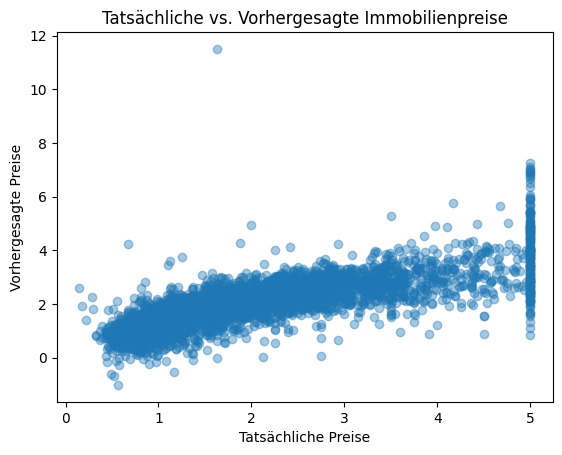
Visualisierung der Vorhersagen
[13]:
plt.scatter(y_test, y_pred, alpha=0.4)
plt.xlabel("Tatsächliche Preise")
plt.ylabel("Vorhergesagte Preise")
plt.title("Tatsächliche vs. Vorhergesagte Immobilienpreise")
plt.show()